(63 intermediate revisions by the same user not shown)
Line 1:
Line 1:
{{info-nfip-sfip}}{{eq-proc-agent}}
{{info-nfip-sfip}}
{{box-summ
{{eq-proc-agent}}
{{box-summary
|color = orange
|color = orange
|title = Summary of Procedure
|title =
|text =
|text = This procedure explains how agents can submit a '''[[NFIP Cancellations|cancellation request for an NFIP policy]]'''. <br>
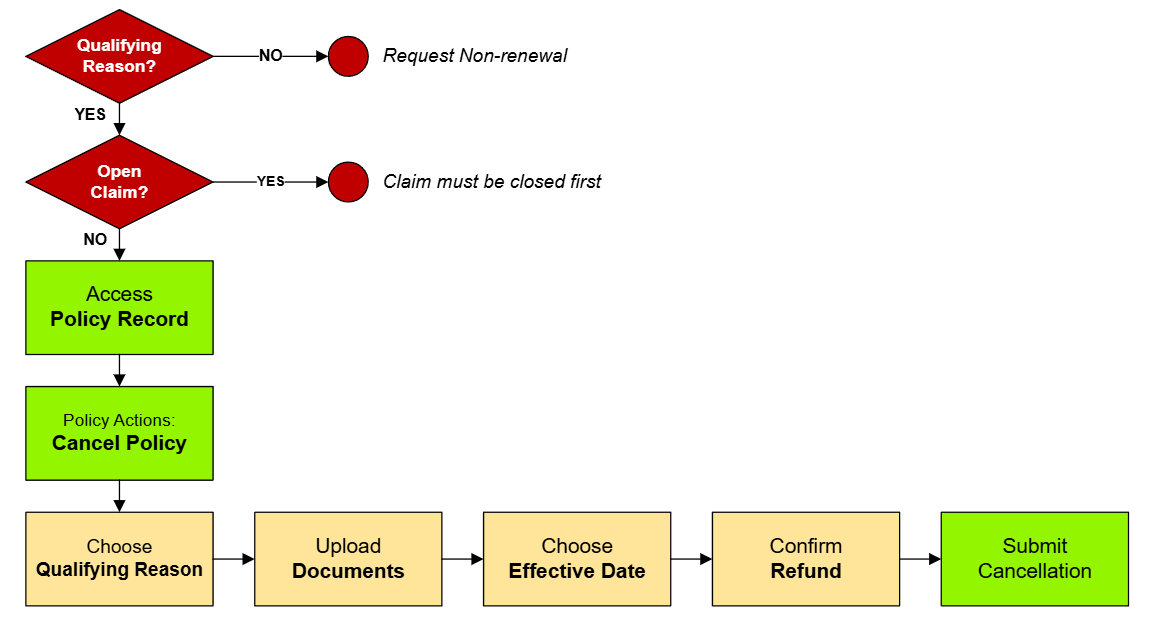
An agent must complete several steps to produce an '''[[NFIP Cancellation Request|cancellation request]]'''. '''[[Equinox]]''' ensures that all required information is collected and validated before the application is submitted. This process is designed to reduce errors and enhance efficiency by guiding the agent through a series of steps that ensure compliance with NFIP guidelines.
This will not auto-issue and must be reviewed by Underwriting before it is cancelled.
}}
}}
{{Img-proc-nofrm
|file = File:Img-vector-cancellation-submit.png
}}
{{clear}}
== Procedural Steps ==
{{collapsible-section
|number = 1
|title = 1. Policy Record
|content =
{{Box task
|image = Img-proc-cxl-01.png
|size = 300px
|alt =
|caption = Use the "Policy Actions" menu along the right side of the page.
|text = <big>'''Open the [[Policy Record]].'''</big>
To start the policy cancellation process
* Find the '''Policy Actions''' block on the right
* Choose "'''Cancel Policy'''"
== Access the Specific Policy ==
{{Attention|Policies cannot be cancelled because the insured no longer wants it. <br>There must be a Qualifying Reason.}}
#* Navigate to the specific policy in Equinox where the cancellation process will be initiated.
}}
#* Confirm that the policy details displayed are correct.
{{Box task
|image = Img-proc-cxl-02.png
|size = 300px
|alt =
|caption = NFIP Policy Cancellation page
|text = <big>This will open the '''NFIP Policy Cancellation''' page.</big>
== Select the Appropriate Cancellation Reason Code ==
This page has the following sections:
#* From the predefined list in Equinox, choose the reason code that corresponds to the circumstances of the cancellation.
# '''Qualifying Reason''' dropdown list
#* Ensure the selected code aligns with the policyholder’s request and complies with NFIP guidelines.
# Upload '''Cancellation Documents'''
# Cancellation '''Effective Date'''
# Cancellation '''Refund and Mailing''' Instructions
# '''Abandon''': Exit the cancellation without submitting anything
# '''Submit''': Create the Request Form and add any uploaded cancellation documents
All sections will be shown after a '''Qualifying Reason''' is chosen from the first dropdown box.
}}
<!-- END OF COLLAPSIBLE SECTION -->
}}
{{collapsible-section
|number = 2
|title = 2. Qualifying Reason
|content =
<big>'''Choose the appropriate Qualifying Reason.'''</big>
{{Box task
|image = Img-proc-cxl-03.png
|size = 400px
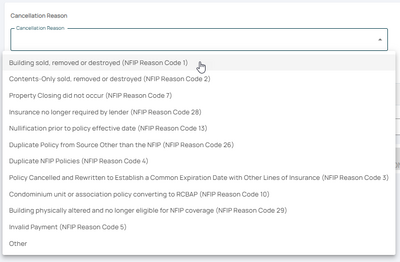
|caption = Choose the appropriate qualifying reason from the dropdown list
|text =
The NFIP '''[[Cancellation Qualifying Reasons]]''' are listed from the top-down based on how common they are.
== Upload Required Documentation ==
For instance, most policies are cancelled after the sale of the building, which is at the top of the list.
#* Gather all supporting documents necessary for the selected reason code (e.g., bill of sale, lender statement, proof of destruction).
* The '''Reason Codes''' are used for reporting to FEMA
#* Upload these documents directly to the policy in Equinox.
* The Qualifying Reason will determine the cancellation '''effective date'''
#* Verify that all uploaded files meet NFIP requirements and are legible.
* The '''Reason Code can be changed''' after submitting the request to Underwriting
}}
}}
{{collapsible-section
|number = 3
|title = 3. Supporting Documentation
|content = <big>'''Upload the Supporting Documentation.'''</big>
{{Box task
|image = Img-proc-cxl-04.png
|size = 400px
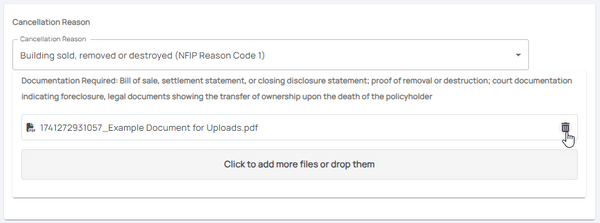
|caption = Upload supporting documentation for the cancellation
|text =
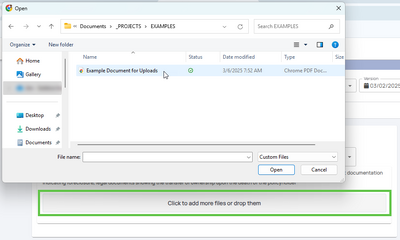
Select the button that shows "'''Click to add more files or drop them'''".
== Complete the Cancellation Request Form ==
Upload any '''[[Required Cancellation Documents]]''' as shown under the '''Qualifying Reason''', such as:
#* Fill out the cancellation request form within Equinox.
* Proof of sale (Reason Code 01)
#* Ensure all required fields, such as cancellation effective date and policyholder information, are completed accurately.
This procedure explains how agents can submit a cancellation request for an NFIP policy.
This will not auto-issue and must be reviewed by Underwriting before it is cancelled.
Procedural Steps
1. Policy Record
Use the "Policy Actions" menu along the right side of the page.










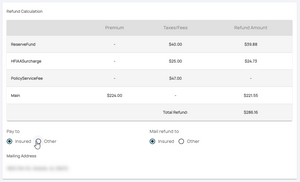
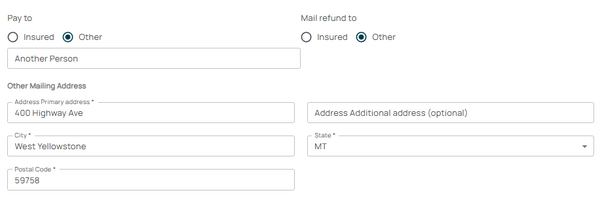 If "Other" is chosen, complete the form fields to adjust who is shown on the check and where it will be mailed.


