(28 intermediate revisions by the same user not shown)
Line 4:
Line 4:
|color = blue
|color = blue
|title =
|title =
|text = This procedure explains how agents can submit a '''First Notice of Loss''' (FNOL) in the Equinox platform. This initiates the claims process for a policyholder after a loss event.
|text = This procedure explains how agents can submit a '''First Notice of Loss''' (FNOL) in the Equinox platform.<br>
This initiates the claims process for a policyholder after a loss event.
}}
}}
== Procedural Steps ==
== Procedural Steps ==
{{collapsible-section
{{collapsible-section
|number = 1
|number = 1
|title = 1. Access Policy Record
|title = 1. Open New Claim
|content =
|content =
A claim can be started one of two ways, which requires access to the policy.
A claim can be started '''one of two ways''' (A or B, not both), which requires access to the policy.
----
<big>'''A. Click the Report Claim button''' at the top of the '''[[Agency Workspace]]'''</big>
* The next page will prompt to search for a policy number.
* Enter the policy number.
* Choose the correct policy from the list.
{{Box task
{{Box task
|image = Img-proc-fnol-01-workspace.png
|image = Img-proc-fnol-01-workspace.png
Line 19:
Line 25:
|text =
|text =
}}
}}
<big>1. Find the '''Report Claim''' button at the top of the Agency Workspace under the Search bar.</big>
* Enter the policy number in the search bar on the following page.
* Choose the correct policy from the list.
Or...
----
----
{{Box task
{{Box task
Line 29:
Line 31:
|alt =
|alt =
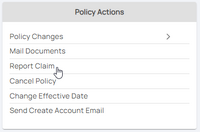
|caption = Use the "Policy Actions" menu along the right side of the page and click on "Report Claim"
|caption = Use the "Policy Actions" menu along the right side of the page and click on "Report Claim"
|text = <big>'''2. Open the [[Policy Record]] to start'''</big>
|text = <big>'''B. Start from the [[Policy Record]]'''</big>
* Find the '''Policy Actions''' block on the right
* Find the '''Policy Actions''' block on the right
* Choose '''Report Claim'''
* Choose '''Report Claim'''
}}
----
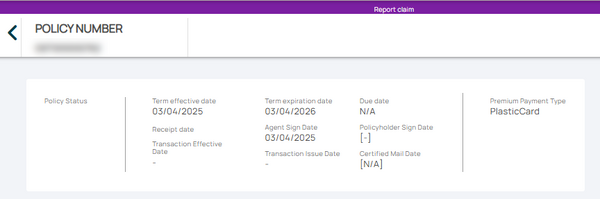
The '''Report Claim''' page will open with a summary of the policy term.
{{Img-proc-free
|style = padding-top: 1em
|file = Img-proc-fnol-02.png
|caption = The '''Report Claim''' page will open with a summary of the policy term.
}}
}}
<!-- END OF COLLAPSIBLE SECTION -->
<!-- END OF COLLAPSIBLE SECTION -->
Line 37:
Line 46:
{{collapsible-section
{{collapsible-section
|number = 2
|number = 2
|title = 2. Edit
|title = 2. Gather Information
|content =
|content =
<big>Use the '''Edit button''' (pencil icon) below the Primary Insured contact details.</big><br>
<big>'''Complete each section below.'''</big><br>
''(Click to open if they are collapsed)''
{{collapsible-details
|number = 21
|title = Claimant Information
|content =
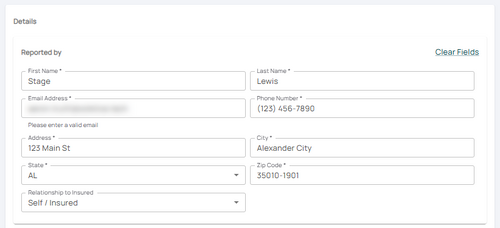
<big>Enter or confirm the details of the person who has stated the loss occurred.</big><br>
The fields will prepopulate with the policyholder information, which must be updated.
{{Img-proc-free
|style = padding-top: 1em
|file = Img-proc-fnol-03.png
|size = 500px
|caption = Confirm or update the claimants contact information.
}}
}}
{{collapsible-details
|number = 22
|title = Loss Date
|content =
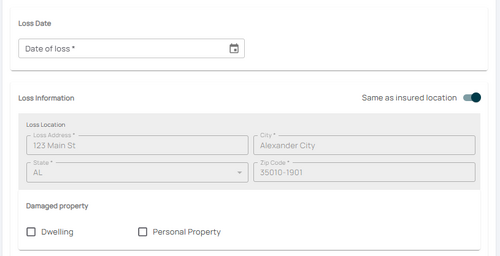
Scroll down to the '''Loss Date''' section and enter the date of loss.
* The loss cannot be a future date. The claim must have incurred damage to the subject property.
* Confirm the '''Loss Location'''.
* Confirm the property that was damaged (building, personal property, or both).
{{Img-proc-free
{{Img-proc-free
|style = padding-top: 1em
|style = padding-top: 1em
|file = Img-proc-change-billing-edit.png
|file = Img-proc-fnol-04.png
|size = 500px
|size = 500px
|caption = Use the Edit button (pencil icon) below the Primary Insured contact details to change the Renewal Billing Instructions field.
|caption = Enter the Date of Loss and confirm the loss location, including the type of property damaged.
}}
}}
This will open the Renewal Billing Instructions fields for editing.
{{Box task
|image = Img-proc-change-billing-save.png
|size = 300px
|alt = An image showing the options in the Policyholder section.
|caption = Make the appropriate selections to the Renewal Billing Instructions as needed.
|text =
<big>'''Section 1:''' Is the Policy Force Placed by the Lender?</big>
If the lender (mortgagee) required the NFIP policy as a condition to a loan, then select the "Yes" radio button.<br>
This procedure explains how agents can submit a First Notice of Loss (FNOL) in the Equinox platform.
This initiates the claims process for a policyholder after a loss event.
Procedural Steps
1. Open New Claim
A claim can be started one of two ways (A or B, not both), which requires access to the policy.
A. Click the Report Claim button at the top of the Agency Workspace
The next page will prompt to search for a policy number.
Enter the policy number.
Choose the correct policy from the list.
Find the button on the Agency Dashboard.
Use the "Policy Actions" menu along the right side of the page and click on "Report Claim"