(5 intermediate revisions by the same user not shown)
Line 4:
Line 4:
|color = blue
|color = blue
|title =
|title =
|text = This procedure explains how agents can submit a '''First Notice of Loss''' (FNOL) in the Equinox platform. This initiates the claims process for a policyholder after a loss event.
|text = This procedure explains how agents can submit a '''First Notice of Loss''' (FNOL) in the Equinox platform.<br>
This initiates the claims process for a policyholder after a loss event.
}}
}}
== Procedural Steps ==
== Procedural Steps ==
Line 115:
Line 116:
|number = 4
|number = 4
|title = 4. Review and Submit
|title = 4. Review and Submit
|content = Review the changes for accuracy and completeness before finalizing.<br>
|content = Review all the information on the single page for accuracy and completeness before finalizing.<br>
Once the effective date is entered, click the Issue button.
Confirm the details with the claimant. This provides accuracy and assurance.
* The "Abort" button will exit without saving any details.
* The "'''Discard'''" button will move the user back to the [[Policy Record]] or the [[Agency Workspace]].
{{Img-proc-free
{{Img-proc-free
|style = padding-top: 1em
|style = padding-top: 1em
|file = Img-proc-effective-date-buttons.png
|file = Img-proc-fnol-07.png
|caption = Click the Issue button to finish the policy change.
|caption = Click the "Submit Information and Report Claim" button to finish reporting the claim.
}}
}}
{{clear}}
{{clear}}
The system will process the change immediately.
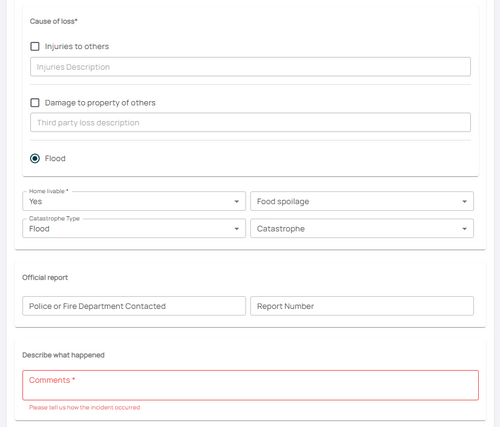
The system will process the [[First Notice of Loss]] after the "'''Submit Information and Report Claim'''" button is clicked.
* A Declarations page with the updated information will be available in the Documents section of the Policy Record.
* Catastrophic events may not assign a Claims Adjuster immediately.
* If a Renewal Notice exists and the policy has not expired, then a new Renewal Notice will be sent to the updated payor.<br>
* If a Renewal Notice exists and the policy has not expired, then a new Renewal Notice will be sent to the updated payor.<br>
'''If the lender or insured needs an immediate copy, then one can be downloaded and emailed.'''
This procedure explains how agents can submit a First Notice of Loss (FNOL) in the Equinox platform.
This initiates the claims process for a policyholder after a loss event.
Procedural Steps
1. Open New Claim
A claim can be started one of two ways (A or B, not both), which requires access to the policy.
A. Click the Report Claim button at the top of the Agency Workspace
The next page will prompt to search for a policy number.
Enter the policy number.
Choose the correct policy from the list.
Find the button on the Agency Dashboard.
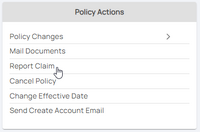
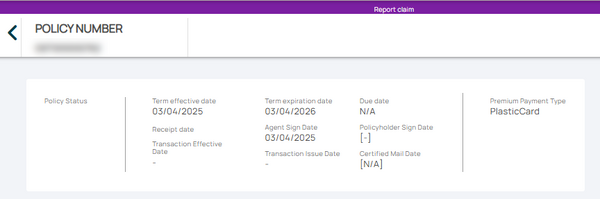
Use the "Policy Actions" menu along the right side of the page and click on "Report Claim"