
Submit Change to NFIP Policy: Difference between revisions
No edit summary |
No edit summary |
||
| Line 10: | Line 10: | ||
}}{{clear}} | }}{{clear}} | ||
== Policy Changes List == | == Policy Changes List == | ||
The table below lists the most common NFIP Policy Changes submitted by agents. | |||
The links in the Policy Section column will show more details about each Policy Change lower on the page. | |||
The links in the Functions column will go to specific procedural instruction pages. | |||
{| class="wikitable sortable" style="width:100%;" | {| class="wikitable sortable" style="width:100%;" | ||
! Policy Section | ! Policy Section | ||
| Line 109: | Line 113: | ||
|Event or Inception | |Event or Inception | ||
|Rating Change*** | |Rating Change*** | ||
|- | |||
|Structural Variables | |||
|Edit | |||
|No | |||
|Yes | |||
|Event or Inception | |||
|Policy Change | |||
|} | |} | ||
| Line 115: | Line 126: | ||
== NFIP Policy Change Details == | == NFIP Policy Change Details == | ||
=== | === Structural Variables === | ||
{| class="wikitable sortable" style="width:100%;" | The building's Structural Variables are found in the Risk Characteristics section of the Policy Record. | ||
They can only be edited, not Added or Deleted. Policy Changes to Structural Variables require Underwriting review. | |||
When a structural variable changes, documentation that proves the change is required. The effective date for changes is always the date the change occurred. | |||
When a structural variable needs to be corrected, an agent statement that it was incorrect on the original application is required. The effective date for corrections is always the policy inception date. | |||
{| class="wikitable sortable mw-collapsible" style="width:100%;" | |||
!Policy Section | !Policy Section | ||
! | !FIM | ||
! | !Details | ||
|- | |- | ||
|Primary Residence | |Primary Residence | ||
| | | | ||
| | | | ||
|- | |- | ||
|Occupancy* | |Occupancy* | ||
| | | | ||
| | | | ||
|- | |- | ||
|Building Description | |Building Description | ||
| | | | ||
| | | | ||
|- | |- | ||
|Detached Structures | |Detached Structures | ||
| | | | ||
| | | | ||
|- | |- | ||
|Building Over Water | |Building Over Water | ||
| | | | ||
| | | | ||
|- | |- | ||
|Foundation Type | |Foundation Type | ||
| | | | ||
| | | | ||
|- | |- | ||
|Number of Floors | |Number of Floors | ||
| | | | ||
| | | | ||
|- | |- | ||
|Number of Units | |Number of Units | ||
| | | | ||
| | | | ||
|- | |- | ||
|Floor of Unit | |Floor of Unit | ||
| | | | ||
| | | | ||
|- | |- | ||
|Foundation Description | |Foundation Description | ||
| | | | ||
| | | | ||
|- | |- | ||
|Number of Elevators | |Number of Elevators | ||
| | | | ||
| | | | ||
Revision as of 13:46, 7 March 2025


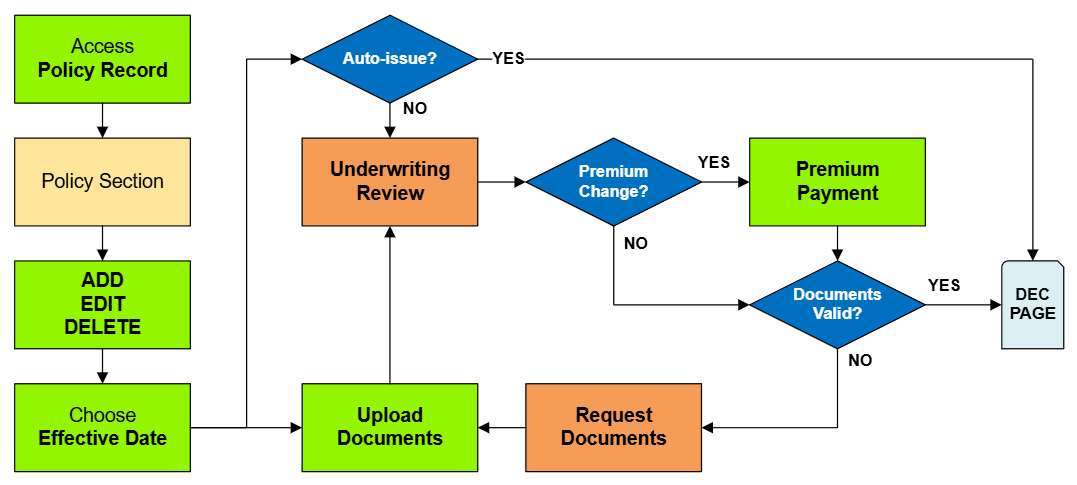
This page serves as a directory for various NFIP Policy Changes agents can request through Equinox. Each change type includes details about the process, effective dates, and required documentation. Agents can reference individual procedures for more specific instructions.
|
Policy Changes List
The table below lists the most common NFIP Policy Changes submitted by agents.
The links in the Policy Section column will show more details about each Policy Change lower on the page.
The links in the Functions column will go to specific procedural instruction pages.
| Policy Section | Functions | Auto-issue | Documents | Effective Date | NFIP Category |
|---|---|---|---|---|---|
| Primary Insured Contact Details | Edit | Yes | No | Request | Administrative |
| Renewal Billing Instructions | Edit | Yes | No | Request | Administrative |
| Mortgagee Clause | Add, Edit, Delete | Yes | No | Request | Policy Interests |
| Insured Name Correction | Edit | Yes | No | Inception | Administrative |
| Insured Name Update | Edit | No | Yes | Event | Policy Change |
| Additional Insured | Add, Edit, Delete | Yes | Yes | Event or Request | Policy Interests |
| Co-insured | Add, Edit, Delete | Yes | Yes | Event or Request | Policy Interests |
| Policy Assignment | Edit | No | Yes | Event | Policy Interests |
| Coverage Increase | Add, Edit | No | No | Calculated | Coverage Increases |
| Deductible Decrease | Edit, Delete | No | Yes | Calculated | Coverage Increases |
| Coverage Decrease | Edit, Delete | No | Yes | Event or Inception** | Coverage Decreases |
| Deductible Increases | Add, Edit | No | No | Event or Request | Coverage Decreases |
| Elevation Certificate | Add, Edit, Delete | No | Yes | Event or Inception | Rating Change*** |
| Structural Variables | Edit | No | Yes | Event or Inception | Policy Change |
NFIP Policy Change Details
Structural Variables
The building's Structural Variables are found in the Risk Characteristics section of the Policy Record.
They can only be edited, not Added or Deleted. Policy Changes to Structural Variables require Underwriting review.
When a structural variable changes, documentation that proves the change is required. The effective date for changes is always the date the change occurred.
When a structural variable needs to be corrected, an agent statement that it was incorrect on the original application is required. The effective date for corrections is always the policy inception date.
| Policy Section | FIM | Details |
|---|---|---|
| Primary Residence | ||
| Occupancy* | ||
| Building Description | ||
| Detached Structures | ||
| Building Over Water | ||
| Foundation Type | ||
| Number of Floors | ||
| Number of Units | ||
| Floor of Unit | ||
| Foundation Description | ||
| Number of Elevators |
