
Create NFIP Application: Difference between revisions
| Line 81: | Line 81: | ||
==Step 6: Elevation Certificate Information== | ==Step 6: Elevation Certificate Information== | ||
The '''Elevation Certificate Information''' step requires agents to manually enter key details from | The '''Elevation Certificate Information''' step requires agents to manually enter key details from an Elevation Certificate (EC). '''Elevation Certificates are optional.''' | ||
If entering information from an Elevation Certificate, agents must: | |||
* Select the building diagram number from a dropdown menu. | * Select the building diagram number from a dropdown menu. | ||
* Identify the section of the EC (C, E, or H) where measurements are recorded. | * Identify the section of the EC (C, E, or H) where measurements are recorded. | ||
Revision as of 10:23, 26 November 2024



Overview
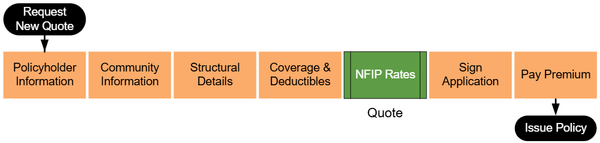
An agent must complete several steps to produce an NFIP application or get a quote. Equinox follows the workflow shown below. Quotes are available at the "NFIP Rates" step shown in green.
Request New Quote
To quote a property with the NFIP, start in the Agency Workspace and select the "Request New Quote" button near the top of the page.

Property Address
Enter the property address. A verified address should show from the first dropdown window.
Choose "NFIP Flood" from the second drop down window.

For property address issues, consult the Application Reference.
Step 1: Basic Information
After assigning the property address, the policy effective date and insured details must be entered.
Effective Date
NFIP quotes are made in real time and rates are subject to change. All quotes must follow the NFIP waiting period rules assigned to new policies. For more information about each waiting period rule and how to calculate the application effective date, refer to the Effective Date Calculator.

Insured Details
The policyholder should be identified as an individual or a legal entity, such as a trust. An additional co-insured can be added by clicking the slider option below the Insured Email Address.
Step 2: Third Party Data
The Third Party Data step pre-populates essential property details from public records. Agents should review all data for accuracy and manually input any missing information.

Review Pre-Populated Data:
- Ensure accuracy for all fields. For a detailed explanation of each field, see the Application Reference.
Enter Missing Information:
- Manually complete any fields not pre-populated.
Edit Incorrect Data:
- Update fields if inaccuracies are found and note discrepancies for follow-up.
Step 3: Property Information
The Property Information step collects essential details about the property's occupancy and the policy's interests.
This is important as the interest the applicant has in the building determines the types of coverage available to them.

For a detailed explanation of occupancy, residency, and insurable interest, refer to Application Reference.
Step 4: Building Type
The Building Type step allows agents to select the building's occupancy type and description. This step uses a button-based interface to simplify the process.
For a detailed explanation of each occupancy type and building description, refer to the Application Reference.
Step 5: Foundation Type
The Foundation Type step uses a series of radio buttons to help agents select the correct foundation type for the building. Clicking on a radio button displays images of foundation types, which can be clicked to finalize the selection.
Agents must also answer a single question about the number of elevators in the building.
For more details about foundation types and related considerations, refer to the Application Reference.
Step 6: Elevation Certificate Information
The Elevation Certificate Information step requires agents to manually enter key details from an Elevation Certificate (EC). Elevation Certificates are optional.
If entering information from an Elevation Certificate, agents must:
- Select the building diagram number from a dropdown menu.
- Identify the section of the EC (C, E, or H) where measurements are recorded.
- Enter the EC signature date.
The system will automatically determine if the residence is eligible for floodproofing based on community details.
For further guidance on using elevation certificates, refer to the relevant subpage in the Application Reference.
Step 7: Qualifying Questions
The Qualifying Questions step assesses the building's eligibility for coverage with the National Flood Insurance Program (NFIP). Agents must confirm that the property meets specific structural and locational criteria, such as the building's structural makeup and location relative to bodies of water.
These items are pre-filled for common situations for eligible buildings.
Selecting some of them may change rates or make the structure ineligible for coverage.
For detailed information on NFIP building eligibility requirements, refer to the Application Reference.
Step 8: Coverage, Deductibles & Discounts
The Coverage, Deductibles & Discounts step allows agents to select policy coverage amounts, choose deductible options, and confirm discount eligibility for the applicant.

Discount Eligibility Agents must answer questions to determine eligibility for specific NFIP discounts, such as:
- Prior policy status, including lapses for Newly Mapped or Pre-FIRM discounts.
- The elevation of essential equipment, such as air conditioners, water heaters, and elevator machinery, above the first-floor elevation.
The system will automatically calculate eligibility for newly mapped discounts based on entered details.
Coverage and Deductibles Agents must manually enter the desired policy coverage amounts for the building and contents, as well as select deductible options from predefined ranges.
For additional guidance on coverage and discount eligibility, refer to the relevant subpage in the Application Reference.
Step 9: Rates
The Rates step provides a summary of the total annual premium, itemized by coverage type and discounts, and collects final details needed to complete the application.
Agents must:
- Review the itemized premium amounts and verify accuracy.
- Enter any of the additional details:
- Insured mailing address
- Additional insureds
- Mortgagee information
- Agent of record
- Provide any additional relevant details in the text box for supplementary information.
- Electronically sign the document.
For more information on completing the Rates step, refer to the relevant subpage in the Application Reference.