
Premium Payment: Difference between revisions
No edit summary |
No edit summary |
||
| Line 1: | Line 1: | ||
{{ | {{eq-proc-agent}}{{draft}} | ||
{{box-summ | {{box-summ | ||
|color = blue | |color = blue | ||
|title = | |title = | ||
|text = | |text = | ||
Payments are required to issue new policies or increase coverage. | |||
}} | }} | ||
== New Business Payment == | |||
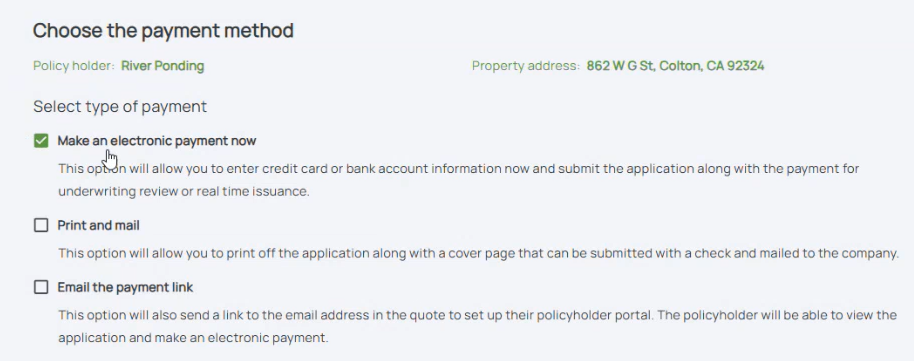
=== Step 1: Choose Electronic Payment === | |||
{{img-proc-nofrm | {{img-proc-nofrm | ||
|file = File:Img-eq-pay-01.png | |file = File:Img-eq-pay-01.png | ||
}} | }} | ||
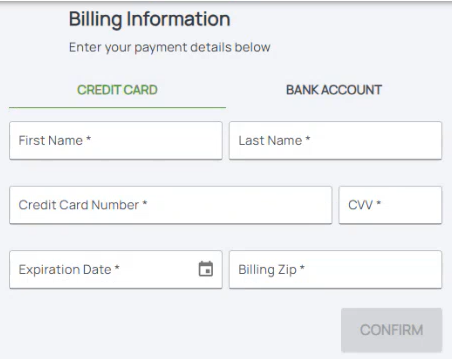
=== Step 2: Enter Credit Card or Bank Account === | |||
{{img-proc-nofrm | {{img-proc-nofrm | ||
|file = File:Img-eq-pay-02.png | |file = File:Img-eq-pay-02.png | ||
}} | }} | ||
The workflow shown above begins by entering basic property details and continues through collecting additional information about the building, coverage options, and flood zone determinations. At the "NFIP Rates" step, highlighted in green, agents can generate a '''preliminary quote''' based on the details provided. This allows the agent to review potential costs before signing the application and collecting premium. | The workflow shown above begins by entering basic property details and continues through collecting additional information about the building, coverage options, and flood zone determinations. At the "NFIP Rates" step, highlighted in green, agents can generate a '''preliminary quote''' based on the details provided. This allows the agent to review potential costs before signing the application and collecting premium. | ||
Revision as of 13:19, 5 December 2024


Payments are required to issue new policies or increase coverage.
|
New Business Payment
Step 1: Choose Electronic Payment
Step 2: Enter Credit Card or Bank Account
The workflow shown above begins by entering basic property details and continues through collecting additional information about the building, coverage options, and flood zone determinations. At the "NFIP Rates" step, highlighted in green, agents can generate a preliminary quote based on the details provided. This allows the agent to review potential costs before signing the application and collecting premium.