
Renew NFIP Policy: Difference between revisions
No edit summary |
No edit summary |
||
| Line 1: | Line 1: | ||
{{info-nfip-sfip}}{{eq-proc-agent}} | {{info-nfip-sfip}} | ||
This page outlines the steps an agent will follow in the Equinox system to renew an NFIP policy, with a focus on completing the payment process. | {{eq-proc-agent}} | ||
{{box-summary | |||
|color = orange | |||
|title = | |||
|text = This page outlines the steps an agent will follow in the Equinox system to renew an NFIP policy, with a focus on completing the payment process. | |||
}} | |||
{{img-proc-nofrm | |||
|file = File:Flow-eq-quote-overview.png | |||
}} | |||
{{lorem}} | |||
{{clear}} | |||
{{collapsible-section | |||
|number = 1 | |||
|title = Step 1: Find the Policy | |||
|content = | |||
Text of the information (edit this).<br> | |||
{{img-proc-frm | |||
|file = File:Img-eq-app-01.png | |||
|width = 600px | |||
}} | |||
Any other text below an image (edit image and this line). | |||
}} | |||
{{collapsible-section | |||
|number = 2 | |||
|title = Step 2: Click "Check Out" | |||
|content = | |||
Text of the information (edit this).<br> | |||
{{img-proc-frm | |||
|file = File:Img-eq-app-01.png | |||
|width = 600px | |||
}} | |||
Any other text below an image (edit image and this line). | |||
}} | |||
{{collapsible-section | |||
|number = 3 | |||
|title = Step 3: Find Billing Information | |||
|content = | |||
Text of the information (edit this).<br> | |||
{{img-proc-frm | |||
|file = File:Img-eq-app-01.png | |||
|width = 600px | |||
}} | |||
Any other text below an image (edit image and this line). | |||
}} | |||
{{collapsible-section | |||
|number = 4 | |||
|title = Step 4: Update Billing Information | |||
|content = | |||
Text of the information (edit this).<br> | |||
{{img-proc-frm | |||
|file = File:Img-eq-app-01.png | |||
|width = 600px | |||
}} | |||
Any other text below an image (edit image and this line). | |||
}} | |||
{{collapsible-section | |||
|number = 5 | |||
|title = Step 5: Complete the Update | |||
|content = | |||
Text of the information (edit this).<br> | |||
{{img-proc-frm | |||
|file = File:Img-eq-app-01.png | |||
|width = 600px | |||
}} | |||
Any other text below an image (edit image and this line). | |||
}} | |||
* Renewing an NFIP policy ensures continuous coverage for the policyholder. | * Renewing an NFIP policy ensures continuous coverage for the policyholder. | ||
* The renewal process requires accurate policy details and timely payment of the renewal premium. | * The renewal process requires accurate policy details and timely payment of the renewal premium. | ||
Revision as of 13:56, 16 December 2024


This page outlines the steps an agent will follow in the Equinox system to renew an NFIP policy, with a focus on completing the payment process.
|
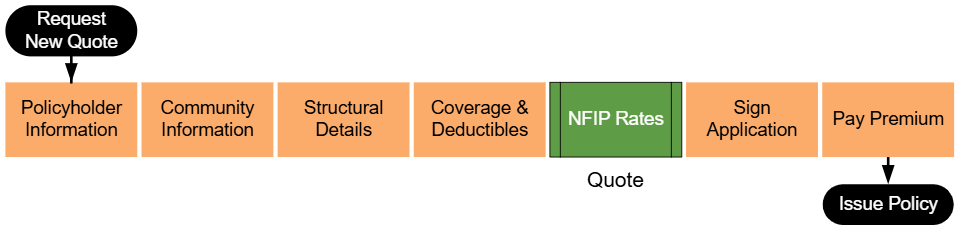
Lorem ipsum dolor sit amet, consectetur adipiscing elit, sed do eiusmod tempor incididunt ut labore et dolore magna aliqua. Ut enim ad minim veniam, quis nostrud exercitation ullamco laboris nisi ut aliquip ex ea commodo consequat. Duis aute irure dolor in reprehenderit in voluptate velit esse cillum dolore eu fugiat nulla pariatur. Excepteur sint occaecat cupidatat non proident, sunt in culpa qui officia deserunt mollit anim id est laborum.
Step 1: Find the Policy
Text of the information (edit this).
 Any other text below an image (edit image and this line).
Step 2: Click "Check Out"
Text of the information (edit this).
Any other text below an image (edit image and this line).
Step 3: Find Billing Information
Text of the information (edit this).
Any other text below an image (edit image and this line).
Step 4: Update Billing Information
Text of the information (edit this).
Any other text below an image (edit image and this line).
Step 5: Complete the Update
Text of the information (edit this).
Any other text below an image (edit image and this line).
- Renewing an NFIP policy ensures continuous coverage for the policyholder.
- The renewal process requires accurate policy details and timely payment of the renewal premium.
- Payments can be made directly through the Equinox system or submitted by the policyholder.
Steps to Renew an NFIP Policy
- Log in to the Equinox system and locate the policy to be renewed.
- Use the search bar to find the policy by number, address, or policyholder name.
- Confirm that the policy is eligible for renewal and that all necessary changes have been scheduled.
- Select the Renewal tab or menu option for the policy.
- Click the Renew Policy button to initiate the renewal process.
- If the button is not visible, ensure that the policy meets renewal eligibility requirements.
- Review the renewal details:
- Coverage Limits: Verify that building and contents coverage amounts are accurate.
- Deductibles: Confirm deductible amounts for the new policy term.
- Premium Amount: Confirm the total premium for the renewal term, including applicable fees and discounts.
- Select a payment method:
- Electronic Payment: Enter the policyholder’s payment details (e.g., bank account or credit card information).
- Check Payment: Record check details and ensure timely submission to the NFIP.
- Third-Party Payment: Upload proof of payment if submitted by a lender or other party.
- Submit the payment through Equinox:
- Confirm that the payment is processed successfully and that a receipt is generated.
- If the payment fails, notify the policyholder to resolve the issue and retry the process.
- Finalize the renewal:
- A confirmation message will appear with the new policy term dates and transaction reference number.
- Provide the policyholder with a copy of the updated declarations page.
Common Issues
- Payment processing failures.
- Double-check payment details and ensure sufficient funds are available.
- Errors in policy details affecting the premium amount.
- Verify that all changes have been applied before processing the renewal.
- Late payments.
- Ensure the payment is submitted before the renewal deadline to avoid policy lapse.
Additional Resources
- NFIP Policy Renewal Payment Methods
- Effective Dates for NFIP Renewals
- How to Resolve Payment Issues During Renewal

