
Pay NFIP New Business: Difference between revisions
No edit summary |
|||
| Line 24: | Line 24: | ||
* Premium amount | * Premium amount | ||
* Payment due date | * Payment due date | ||
[[File:Img-proc-pay-app-select.png|600px]] | |||
}} | }} | ||
{{collapsible-section | {{collapsible-section | ||
Revision as of 11:40, 5 March 2025

This procedure explains how agents can submit premium payments for NFIP New Business applications.
|
Procedural Steps
1: Complete Application
* Log in to the Equinox platform and locate the policy requiring a premium payment.
- Open the policy record to confirm the payment amount and ensure the policy is active.
2: Select Payment Method
* Navigate to the "Policy Actions" menu and select "Submit Payment."
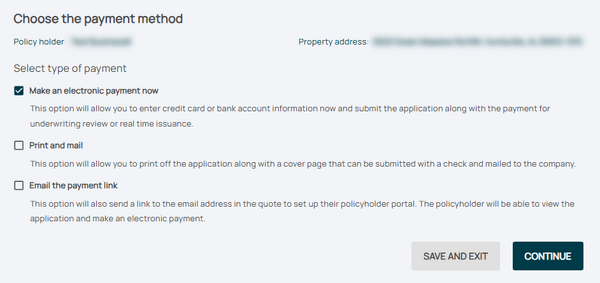
- Review the pre-filled details, including:
 * Policy number
 * Premium amount
 * Payment due date

3: Follow-up
* Provide payment information, such as:
 * Credit card details
 * Bank routing and account numbers
- Confirm the payment amount matches the premium due.
