Submit Change to NFIP Policy: Difference between revisions

From Gulf States Flood Help
No edit summary
No edit summary
Line 199: Line 199:
{{clear}}
{{clear}}


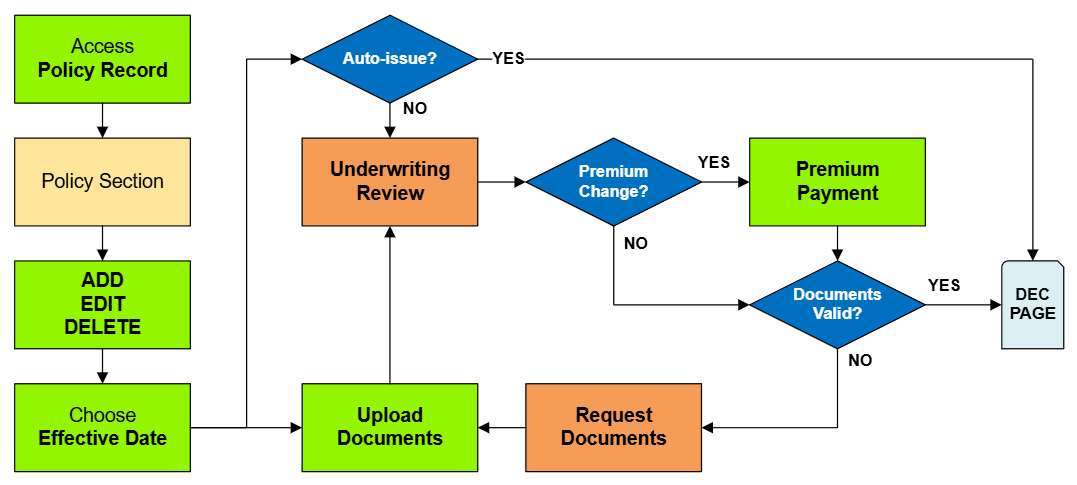
== General Process  ==
== NFIP Policy Change Details ==
{{collapsible-section
 
|number = 1
|title = 1. Access Policy Record
|content =
{{Box task
|image  = Img-proc-change-mtg.png
|size    = 400px
|alt    = An image showing the "Policy Changes" widget along the right side of the page.
|caption = Use the "Policy Changes" widget along the right side of the page.
|text    = <big>'''Open the [[Policy Record]] to start'''</big>
To quickly navigate to the Mortgagees section:
* Find the '''Policy Actions''' block on the right
* Choose '''Policy Changes'''
* From the next menu, click the '''Mortgagees''' option
Otherwise, scroll down to the Mortgagees section manually.
}}
<!-- END OF COLLAPSIBLE SECTION -->
}}
{{collapsible-section
|number = 2
|title = 2. Add / Edit / Delete
|content =
Enter the requested changes using the options below.
{{collapsible-details
|number = 21
|title = Add
|content =
'''To add a mortgagee, follow these steps:'''
{{img-proc-nofrm
|file = File:Img-proc-change-mtg-add.png
|width = 200px
}}
# Click the "Add Mortgagee" button
# Enter the mortgagee information
#* All starred content (seen below) must be entered for the "Add" button to activate
#* Mortgagee Type will sort the mortgagee clause into the proper position
{{img-proc-nofrm
|file = File:Img-proc-change-mtg-details.png
|width = 500px
}}
'''Once all details are entered, click the "Save" button (move to Step 3 below).'''
}}
{{collapsible-details
|number = 22
|title = Edit
|content =
'''To update a mortgagee, follow these steps:'''
{{img-proc-nofrm
|file = File:Img-proc-change-mtg-update.png
|width = 400px
}}
# Click the Pencil icon
# Adjust the appropriate mortgagee information
#* All starred content (seen below) must be entered for the "Save" button to activate
#* Mortgagee Type will sort the mortgagee clause into the proper position, such as when moving a first mortgagee into the second mortgagee position
{{img-proc-nofrm
|file = File:Img-proc-change-mtg-details.png
|width = 500px
}}
'''Once all details are entered, click the "Save" button (move to Step 3 below).'''
}}
{{collapsible-details
|number = 23
|title = Delete
|content =
'''To remove a mortgagee, follow these steps:'''
{{img-proc-nofrm
|file = File:Img-proc-change-mtg-delete.png
|width = 300px
}}
* Click the Trash Can icon
* If needed, the deletion can be reverted (see below)
{{img-proc-nofrm
|file = File:Img-proc-change-mtg-revert.png
|width = 600px
}}
'''Once all details are entered, click the "Save" button (move to Step 3 below).'''
}}
<!-- END OF COLLAPSIBLE SECTION -->
}}
{{collapsible-section
|number = 3
|title = 3. Choose Effective Date
|content =
{{Box task
|image  = Img-proc-effective-date-dropdown.png
|size    = 120px
|alt    = An image of a date being selected
|caption = Choose the correct effective date for the mortgagee clause change
|text    =
Scroll to the top of the page to enter the effective date.
* Backdating is not allowed.
* Enter today's date or a later effective date.
* Choose "None" for the [[Waiting Periods|Waiting Period]].
'''''The Policy Change cannot be completed without choosing an effective date.'''''
}}
<!-- END OF COLLAPSIBLE SECTION -->
}}
{{collapsible-section
|number = 4
|title = 4. Review and Submit
|content = Review the changes for accuracy and completeness before finalizing.<br>
Once the effective date is entered, click the Issue button.
* The "Abort" button will exit without saving any details.
{{Img-proc-free
|style  = padding-top: 1em
|file    = Img-proc-effective-date-buttons.png
|caption = Click the Issue button to finish the policy change.
}}
{{clear}}
The system will process the change immediately. A Declarations page with the updated information will be available in the Documents section of the Policy Record. <br>
'''If the lender or insured needs an immediate copy, then one can be downloaded and emailed.'''
<!-- END OF COLLAPSIBLE SECTION -->
}}


{{needsedit}}
{{needsedit}}
{{line-nfip-endorse}} __NOEDITSECTION__

Revision as of 13:31, 7 March 2025

This Equinox Procedure is for Agents. Find a complete list here.

This page serves as a directory for various NFIP Policy Changes agents can request through Equinox. Each change type includes details about the process, effective dates, and required documentation. Agents can reference individual procedures for more specific instructions.

Policy Changes List

Policy Section Functions Auto-issue Documents Effective Date NFIP Category
Primary Insured Contact Details Edit Yes No Request Administrative
Renewal Billing Instructions Edit Yes No Request Administrative
Mortgagee Clause Add, Edit, Delete Yes No Request Policy Interests
Insured Name Correction Edit Yes No Inception Administrative
Insured Name Update Edit No Yes Event Policy Change
Additional Insured Add, Edit, Delete Yes Yes Event or Request Policy Interests
Co-insured Add, Edit, Delete Yes Yes Event or Request Policy Interests
Policy Assignment Edit No Yes Event Policy Interests
Coverage Increase Add, Edit No No Calculated Coverage Increases
Deductible Decrease Edit, Delete No Yes Calculated Coverage Increases
Coverage Decrease Edit, Delete No Yes Event or Inception** Coverage Decreases
Deductible Increases Add, Edit No No Event or Request Coverage Decreases
Elevation Certificate Add, Edit, Delete No Yes Event or Inception Rating Change***

Risk Characteristics

Policy Section Functions Auto-issue Documents Effective Date NFIP Category
Primary Residence Edit No Yes Event Rating Change
Occupancy* Edit No Yes Event or Inception** Rating Change***
Building Description Edit No Yes Event or Inception** Policy Change
Detached Structures Edit No Yes Event or Inception** Policy Change
Building Over Water Edit No Yes Event or Inception Policy Change
Foundation Type Edit No Yes Event or Inception Policy Change
Number of Floors Edit No Yes Event or Inception Policy Change
Number of Units Edit No Yes
Floor of Unit
Foundation Description
Number of Elevators

NFIP Policy Change Details

This page may need to be edited based on suggestions or concerns. Read more in the Discussion page.

This page contains details about NFIP Policy Changes.
Find more NFIP information in the How To Endorse section of the Flood Insurance Manual.