
Submit Policy Assignment: Difference between revisions
| Line 25: | Line 25: | ||
Print or save the form, then upload it to the [[Policy Documents]]. | Print or save the form, then upload it to the [[Policy Documents]]. | ||
}} | }} | ||
{{Attention|The form must be signed by all parties on or before the closing date.}} | |||
<!-- END OF COLLAPSIBLE SECTION --> | <!-- END OF COLLAPSIBLE SECTION --> | ||
}} | }} | ||
Revision as of 07:42, 11 March 2025


This procedure explains how agents can request a policy assignment. A policy assignment transfers an NFIP policy from the current policyholder to a new policyholder due to a change in ownership.
|
Procedural Steps
1. Complete the Form
Prepare the Policy Assignment Form
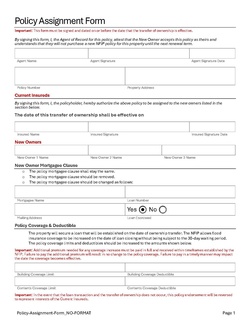 |
A specific form is not required to complete a Policy Assignment. However, the document shown here (click to open) has been created to assist agents with the process. Complete the following fields:
Add other details as applicable, such as the Mortgagee Clause or Primary Residence verification. Print or save the form, then upload it to the Policy Documents. |
The form must be signed by all parties on or before the closing date.
2. Access Policy Record

Open the Policy Record to start
To quickly navigate to the Policyholder section:
- Find the Policy Actions block on the right
- Choose Policy Changes
- From the next menu, click the Policyholder or Co-insured option
3. Add, Edit, Delete
4. Choose Effective Date

Scroll to the top of the page to enter the effective date.
- Enter the appropriate date.
- Backdating to the inception date is allowed for corrections.
- Choose "None" for the Waiting Period.
5. Review and Submit
Review the changes for accuracy and completeness before finalizing.

Once the effective date is entered, click the Issue button.
- The "Abort" button will exit without saving any details.

The system will process the change immediately.
- A Declarations page with the updated information will be available in the Documents section of the Policy Record.
- If a Renewal Notice exists and the policy has not expired, then a new Renewal Notice will be sent.
