
Submit Change to NFIP Coverage: Difference between revisions
Tag: Manual revert |
|||
| Line 140: | Line 140: | ||
|style = padding-top: 1em | |style = padding-top: 1em | ||
|file = Img-proc-change-coverage-premium.png | |file = Img-proc-change-coverage-premium.png | ||
|caption = | |caption = The pro-rated premium amount will be displayed as part of the coverage change. | ||
}} | }} | ||
{{clear}} | {{clear}} | ||
Revision as of 15:20, 11 March 2025


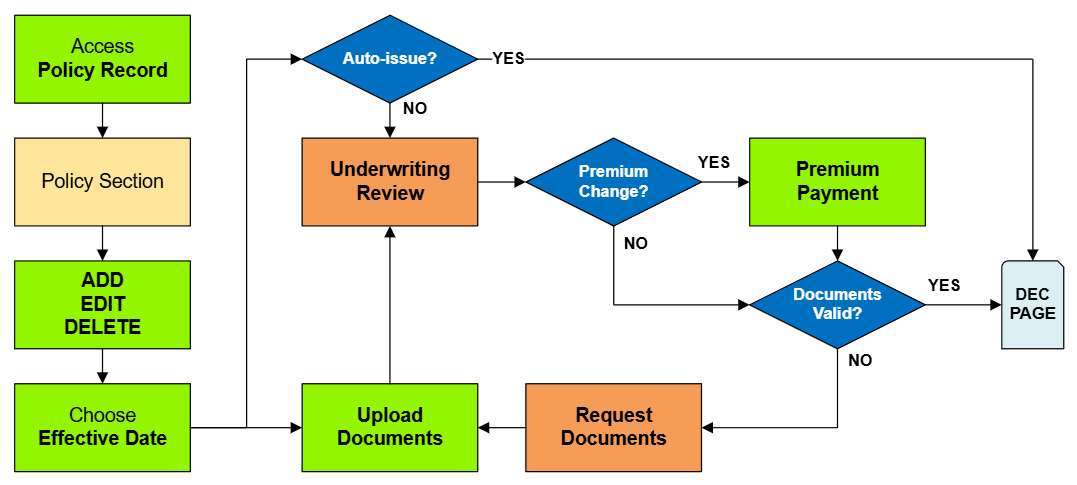
This procedure explains how agents can submit requests to change coverage amounts on an NFIP policy. Coverage changes include increases or decreases to building and contents coverage, as well as deductible changes. Supporting documentation may be required depending on the type of change.
|
Procedural Steps
1. Access Policy Record

To quickly navigate to the Coverages and Deductibles section:
- Find the Policy Actions block on the right
- Choose Policy Changes
- From the next menu, click the Coverages and Deductibles option
2. Edit Coverage

This will open the coverage fields for editing.

Changes to coverage must follow NFIP guidelines for Effective Date calculation and documentation.
Coverage Change Rules
Required Documentation: Premium Payment
When coverage is reduced to zero, the corresponding deductible must be set to zero.
Coverage decreases can be made on upcoming renewals without the requirements needed for policy changes. [1]
Required Documentation: Building coverage: proof the building is over-insured, either through error or removal. [2]
Required Documentation: Duplicate RCBAP coverage: copy of the RCBAP declarations page.
Required Documentation: Contents coverage: proof the property was sold or removed. [3]
Required Documentation: Policyholder's signature [4]
Required Documentation: A lender's letter that requires a lower deductible [7]
Required Documentation: Premium Payment
In general, increases and decreases are typically done in separate transactions with separate payments, but they can be combined.
| Coverage Increase | Coverage Decrease | |
| Deductible Increase | 30-day Wait + No Wait Separate or Combined | No Wait (both) Separate or Combined Cannot backdate deductibles |
| Deductible Decrease | 30-day Wait (both) Combined | No Wait + 30-day Wait Separate Only |
- Coverage Increase + Deductible Increase: The deductible increase can coincide with the coverage increase, or it can be done separately
- Coverage Increase + Deductible Decrease: The deductible decrease can coincide with the coverage increase (same rules apply)
- Coverage Decrease + Deductible Increase: The deductible increase can coincide with a mid-term coverage decrease (no waiting period), or it can be done separately. Deductible increases cannot be backdated.
- Coverage Decrease + Deductible Decrease: These must be done separately, as the rules are too restrictive to combine.
| Example: Coverage Decrease & Deductible Decrease |
A coverage decrease can only happen due to over-insurance, which is effective in the middle of the term (physical change) or at the inception (error). So today or a previous date.
A deductible decrease requires a 30-day wait, unless an exception is applied. So today or future date. |
3. Choose Effective Date

Scroll to the top of the page to enter the effective date.
- Choose the Waiting Period based on the scenarios identified in Section 2.
- Calculate and enter the appropriate date.
4. Review and Submit
Once the effective date is entered, click the Issue button.
- The "Abort" button will exit without saving any details.

