
Submit Change to Structural Variable: Difference between revisions
| Line 44: | Line 44: | ||
<big>'''Make Adjustments to Structural Variables'''</big><br> | <big>'''Make Adjustments to Structural Variables'''</big><br> | ||
These fields describe the physical details of the building, which can be changed over time due to reconstruction or disrepair. | These fields describe the physical details of the building, which can be changed over time due to reconstruction or disrepair. | ||
* Building characteristics should be accurately represented on an NFIP policy. | |||
* They can be corrected if they are not. | |||
}} | }} | ||
{{Docs-req|'''Changes:''' proof of a change to the building, such as a photograph.}} | {{Docs-req|'''Changes:''' proof of a change to the building, such as a photograph.}} | ||
Revision as of 08:15, 12 March 2025


This procedure explains how agents can submit requests to change or correct the building details on an NFIP policy. Most structural variables determine policy rating, so premium may be impacted. Supporting documentation may be required.
|
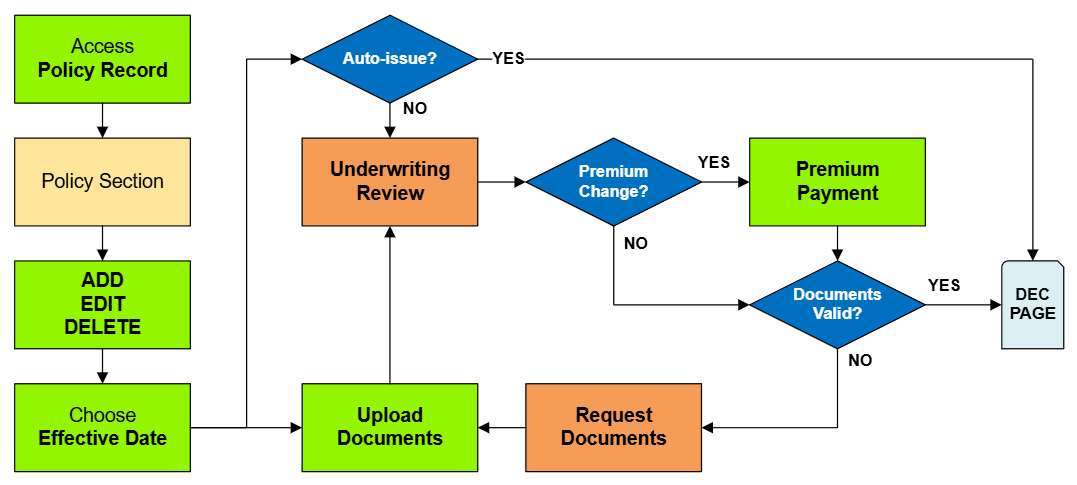
Procedural Steps
1. Access Policy Record
Scroll down to the "Risk Characteristics" section manually.
2. Edit Risk Characteristics

This will open all NFIP structural variable fields for editing.

These fields describe the physical details of the building, which can be changed over time due to reconstruction or disrepair.
- Building characteristics should be accurately represented on an NFIP policy.
- They can be corrected if they are not.
Required Documentation: Changes: proof of a change to the building, such as a photograph.
Required Documentation: Corrections: an agent statement that the item was incorrect on the original application.
Corrections: the effective date is the policy inception date.
3. Choose Effective Date

Scroll to the top of the page to enter the effective date.
- Choose "None" from the Waiting Period dropdown box.
- Determine and enter the appropriate date based on whether this is changing a building detail or correcting it.
4. Review and Submit
Once the effective date is entered, the pro-rated premium amount will be displayed.
- The "Abort" button will exit the process without saving any details.
- The "Submit" button will create the policy change form and mark the policy with "Pending Change" and "Pending Payment" flags.

The system will not process the change immediately.

The Policy Record will show Pending Payment and Pending Change flags.

The policy in the Agency Workspace will show Pending Payment and Pending Change flags.


