
Policy Record: Difference between revisions
No edit summary |
No edit summary |
||
| Line 8: | Line 8: | ||
|file = File:Img-eq-page-layout.png | |file = File:Img-eq-page-layout.png | ||
}} | }} | ||
{| | {| style="padding-right: 1em;" | ||
|- | |||
|1. Workspaces | |1. Workspaces | ||
|2. Search Bar | |2. Search Bar | ||
Revision as of 07:47, 5 December 2024

(general preamble to the Equinox policy screen)
Page Layout
The image here shows the general layout of the policy screen.
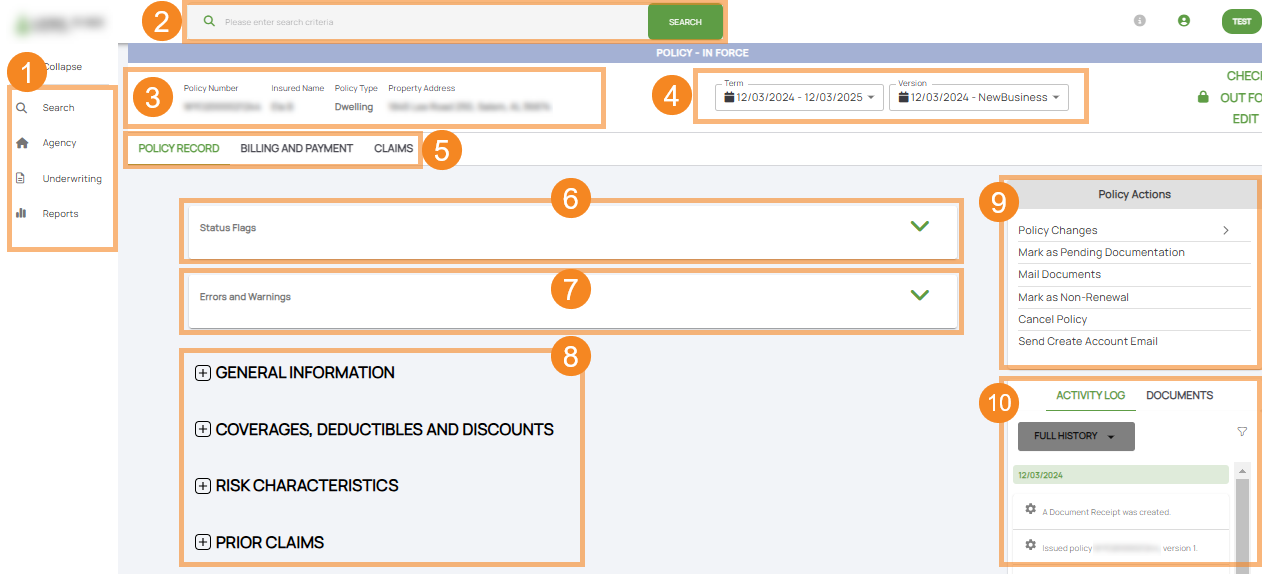
| 1. Workspaces | 2. Search Bar | 3. Summary Block | 4. Policy Term | 5. Page Tabs |
| 6. Status Flags | 7. Errors/Warnings | 8. Policy Details | 9. Policy Actions | 10. Activity Log/Documents |
Policy Record
Selecting a policy record within any of the queues provides the full record of transactions related to a policy, including prior terms and versions. The record shows the current term and the current version when it is first issued. To view information about a term or a version within a term, the Agent or the Underwriter/Customer Service Representative can click on the drop down arrow and all prior terms will show. Selecting a term and a version within a term will provide the policy detail record exactly as it appeared at the time of that transaction.
Billing and Payment
Type stuff here
type stuff here
Policy Actions
Activity Log
Agents also have the ability to see the ACTIVITY LOG (whether system generated or an action taken by the agent or underwriter/customer service) for an individual policy on the POLICY RECORD. The activity log contains all of the transactional information from the time the application is created through the life of the policy term.
Documents
Clicking on the DOCUMENTS header will enable you to view every document that has been generated by Equinox or uploaded to the policy.
Additionally by clicking on the plus sign at the bottom of the DOCUMENTS feature, additional documents may be uploaded to the policy.