
Submit Change to NFIP Policy: Difference between revisions
No edit summary |
No edit summary |
||
| Line 1: | Line 1: | ||
{{info-nfip-sfip}}{{eq-proc-agent}} | {{info-nfip-sfip}} | ||
{{eq-proc-agent}} | |||
{{box-summary | |||
|color = orange | |||
|title = | |||
|text = This page outlines the steps an agent will follow in the Equinox system to make changes or corrections to an NFIP policy. This outlines a general procedure that may need to be adjusted based on the policy field to be changed. | |||
}} | |||
{{img-proc-nofrm | |||
|file = File:Flow-eq-quote-overview.png | |||
}} | |||
{{lorem}} | |||
{{clear}} | |||
{{collapsible-section | |||
|number = 1 | |||
|title = Step 1: Find the Policy | |||
|content = | |||
Text of the information (edit this).<br> | |||
{{img-proc-frm | |||
|file = File:Img-eq-app-01.png | |||
|width = 600px | |||
}} | |||
Any other text below an image (edit image and this line). | |||
}} | |||
{{collapsible-section | |||
|number = 2 | |||
|title = Step 2: Click "Check Out" | |||
|content = | |||
Text of the information (edit this).<br> | |||
{{img-proc-frm | |||
|file = File:Img-eq-app-01.png | |||
|width = 600px | |||
}} | |||
Any other text below an image (edit image and this line). | |||
}} | |||
{{collapsible-section | |||
|number = 3 | |||
|title = Step 3: Find Billing Information | |||
|content = | |||
Text of the information (edit this).<br> | |||
{{img-proc-frm | |||
|file = File:Img-eq-app-01.png | |||
|width = 600px | |||
}} | |||
Any other text below an image (edit image and this line). | |||
}} | |||
{{collapsible-section | |||
|number = 4 | |||
|title = Step 4: Update Billing Information | |||
|content = | |||
Text of the information (edit this).<br> | |||
{{img-proc-frm | |||
|file = File:Img-eq-app-01.png | |||
|width = 600px | |||
}} | |||
Any other text below an image (edit image and this line). | |||
}} | |||
{{collapsible-section | |||
|number = 5 | |||
|title = Step 5: Complete the Update | |||
|content = | |||
Text of the information (edit this).<br> | |||
{{img-proc-frm | |||
|file = File:Img-eq-app-01.png | |||
|width = 600px | |||
}} | |||
Any other text below an image (edit image and this line). | |||
}} | |||
{{draft}} | |||
== How to Submit a Change == | == How to Submit a Change == | ||
Revision as of 13:54, 16 December 2024


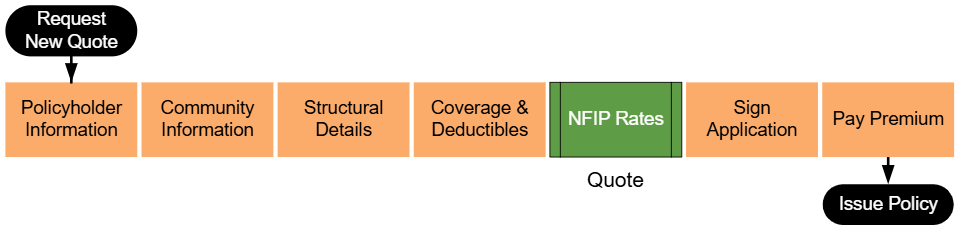
This page outlines the steps an agent will follow in the Equinox system to make changes or corrections to an NFIP policy. This outlines a general procedure that may need to be adjusted based on the policy field to be changed.
|
Lorem ipsum dolor sit amet, consectetur adipiscing elit, sed do eiusmod tempor incididunt ut labore et dolore magna aliqua. Ut enim ad minim veniam, quis nostrud exercitation ullamco laboris nisi ut aliquip ex ea commodo consequat. Duis aute irure dolor in reprehenderit in voluptate velit esse cillum dolore eu fugiat nulla pariatur. Excepteur sint occaecat cupidatat non proident, sunt in culpa qui officia deserunt mollit anim id est laborum.
Step 1: Find the Policy
Text of the information (edit this).
 Any other text below an image (edit image and this line).
Step 2: Click "Check Out"
Text of the information (edit this).
Any other text below an image (edit image and this line).
Step 3: Find Billing Information
Text of the information (edit this).
Any other text below an image (edit image and this line).
Step 4: Update Billing Information
Text of the information (edit this).
Any other text below an image (edit image and this line).
Step 5: Complete the Update
Text of the information (edit this).
Any other text below an image (edit image and this line).

How to Submit a Change
Click here.
Then click here.
Administrative Changes
These should auto-issue.
| Policy Detail | Effective Date | Auto-issue? | Documents |
|---|---|---|---|
| Mortgagee Clause | |||
| Insured Mailing Address | |||
| Renewal Billing |
Policyholder Changes
These require underwriter review.
| Policy Detail | Effective Date | Auto-issue? | Documents |
|---|---|---|---|
| Adding Insured | |||
| Removing Insured | |||
| Updating Insured Name | |||
| Policy Assignment |
Changes to Building Characteristics
These require underwriter review.
| Policy Detail | Effective Date | Auto-issue? | Documents |
|---|---|---|---|
| Occupancy | |||
| Foundation | |||
| BRCV |
Coverage Changes
| Policy Detail | Effective Date | Auto-issue? | Documents |
|---|---|---|---|
| Coverage Increase | |||
| Coverage Decrease | |||
| Deductible Increase | |||
| Deductible Decrease |
