
Submit Change to NFIP Billing Instructions: Difference between revisions
No edit summary |
No edit summary |
||
| Line 34: | Line 34: | ||
|content = | |content = | ||
<big>Use the '''Edit button''' (pencil icon) below the Primary Insured contact details.</big><br> | <big>Use the '''Edit button''' (pencil icon) below the Primary Insured contact details.</big><br> | ||
{{Img-proc-free | {{Img-proc-free | ||
|style = padding-top: 1em | |style = padding-top: 1em | ||
| Line 41: | Line 40: | ||
|caption = Use the Edit button (pencil icon) below the Primary Insured contact details to change the Renewal Billing Instructions field. | |caption = Use the Edit button (pencil icon) below the Primary Insured contact details to change the Renewal Billing Instructions field. | ||
}} | }} | ||
This will open the Renewal Billing Instructions fields for editing. | |||
{{Box task | {{Box task | ||
|image = Img-proc-change-billing-save.png | |image = Img-proc-change-billing-save.png | ||
| Line 47: | Line 47: | ||
|caption = Enter a caption here | |caption = Enter a caption here | ||
|text = | |text = | ||
<big> | <big>Question: Is the policy force placed by the lender?</big> | ||
If the lender (mortgagee) required the NFIP policy as a condition to a loan, then select the "Yes" radio button.<br> | If the lender (mortgagee) required the NFIP policy as a condition to a loan, then select the "Yes" radio button.<br> | ||
Revision as of 11:23, 4 March 2025


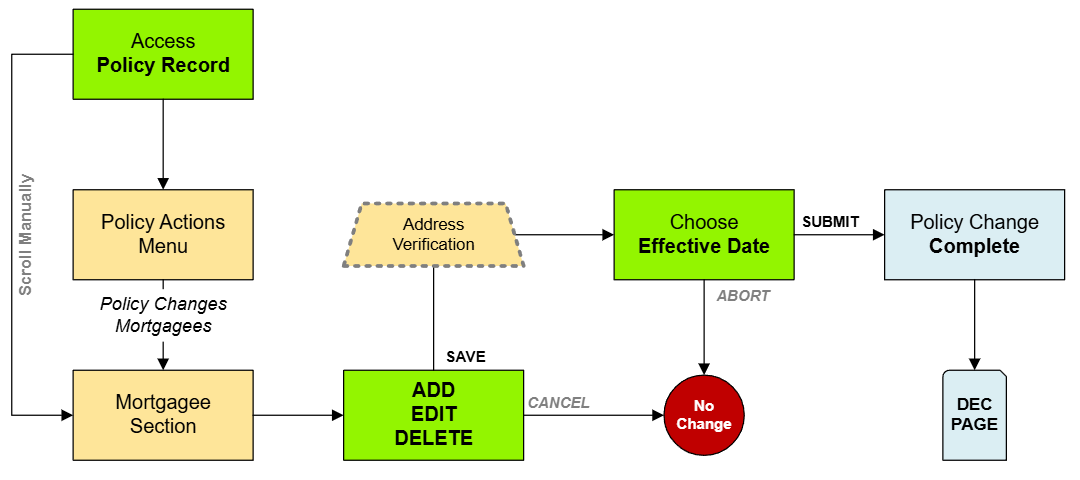
NFIP Renewal Bills can be sent to the insured or other interested parties, such as a named mortgagee. This procedure will show how to update where the renewal bill will be sent.
|
Procedural Steps
1. Access Policy Record

Open the Policy Record to start
To quickly navigate to the Policyholder section:
- Find the Policy Actions block on the right
- Choose Policy Changes
- From the next menu, click the Billing Instructions option
2. Edit
Use the Edit button (pencil icon) below the Primary Insured contact details.
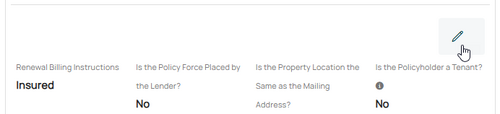
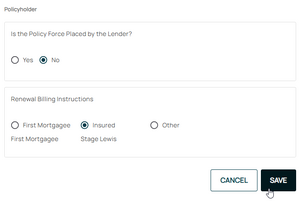
Enter a caption here

This will open the Renewal Billing Instructions fields for editing.

Question: Is the policy force placed by the lender?
If the lender (mortgagee) required the NFIP policy as a condition to a loan, then select the "Yes" radio button.
Renewal Billing Instructions: Other
To update a mortgagee, follow these steps:
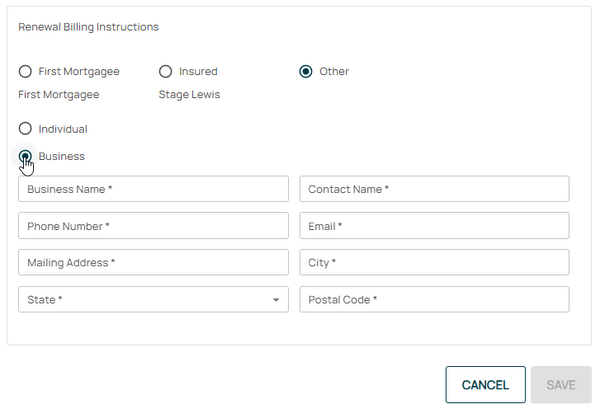
- Click the Pencil icon
- Adjust the appropriate mortgagee information
- All starred content (seen below) must be entered for the "Save" button to activate
- Mortgagee Type will sort the mortgagee clause into the proper position, such as when moving a first mortgagee into the second mortgagee position

3. Choose Effective Date

Scroll to the top of the page to enter the effective date.
- Backdating is not allowed.
- Enter today's date or a later effective date.
- Choose "None" for the Waiting Period.
4. Review and Submit
Review the changes for accuracy and completeness before finalizing.

Once the effective date is entered, click the Issue button.
- The "Abort" button will exit without saving any details.

The system will process the change immediately. A Declarations page with the updated information will be available in the Documents section of the Policy Record.
If a Renewal Notice exists and the policy has not expired, then a new Renewal Notice will be sent to the updated payor.
