NFIP Renewal Bills can be sent to the insured or other interested parties, such as a named mortgagee. This procedure will show how to update where the renewal bill will be sent.
Procedural Steps
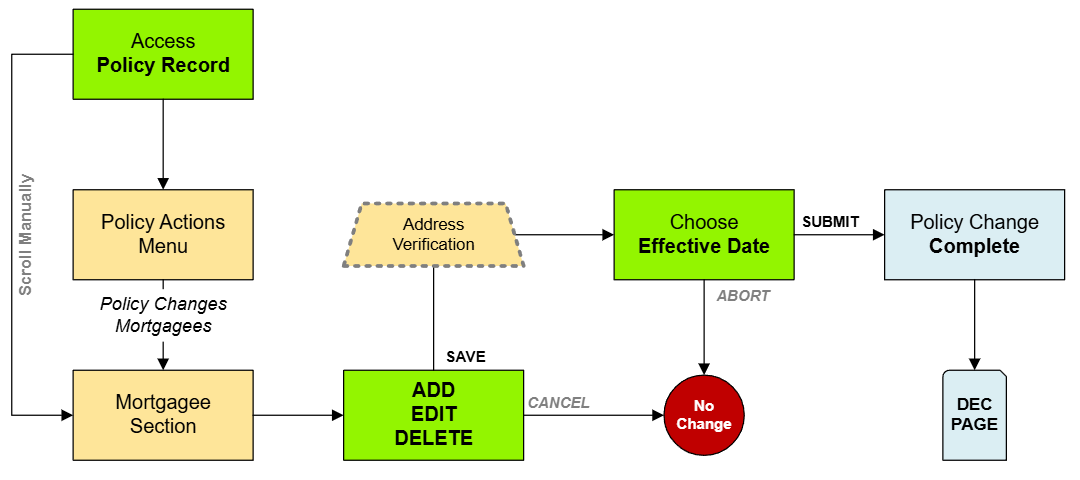
1. Access Policy Record
Use the "Policy Changes" menu along the right side of the page.
From the next menu, click the Billing Instructions option
Otherwise, scroll down to the Policyholder section manually.
2. Edit
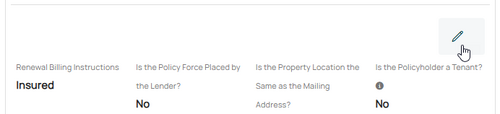
Use the Edit button (pencil icon) below the Primary Insured contact details.
This will open the Renewal Billing Instructions fields for editing.
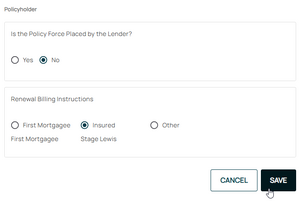
Make the appropriate selections to the Renewal Billing Instructions as needed.
Section 1: Is the Policy Force Placed by the Lender?
If the lender (mortgagee) required the NFIP policy as a condition to a loan, then select the "Yes" radio button.
Section 2: Renewal Billing Instructions
Choose the radio button to make changes to the payor.
Once all details are entered, click the "Save" button (move to Step 3 below).
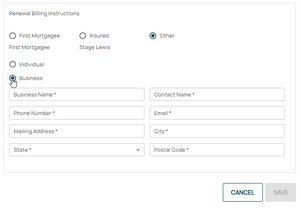
Renewal Billing Instructions: Other
After selecting the Other button, add contact information into the additional fields.
After selecting the Other button, add contact information into the additional fields.
3. Choose Effective Date
Choose the correct effective date for the mortgagee clause change
Scroll to the top of the page to enter the effective date.
The Policy Change cannot be completed without choosing an effective date.
4. Review and Submit
Review the changes for accuracy and completeness before finalizing.
Once the effective date is entered, click the Issue button.
The "Abort" button will exit without saving any details.
The system will process the change immediately. A Declarations page with the updated information will be available in the Documents section of the Policy Record.
If a Renewal Notice exists and the policy has not expired, then a new Renewal Notice will be sent to the updated payor.
If the lender or insured needs an immediate copy, then one can be downloaded and emailed.
This page contains details about NFIP Policy Changes.
Find more NFIP information in the How To Endorse section of the Flood Insurance Manual.