
Policy Actions
The Policy Actions menu on the Policy Record page provides a list of tasks agents can perform to manage policies. Each action outlines the available self-service features for insurance agents.
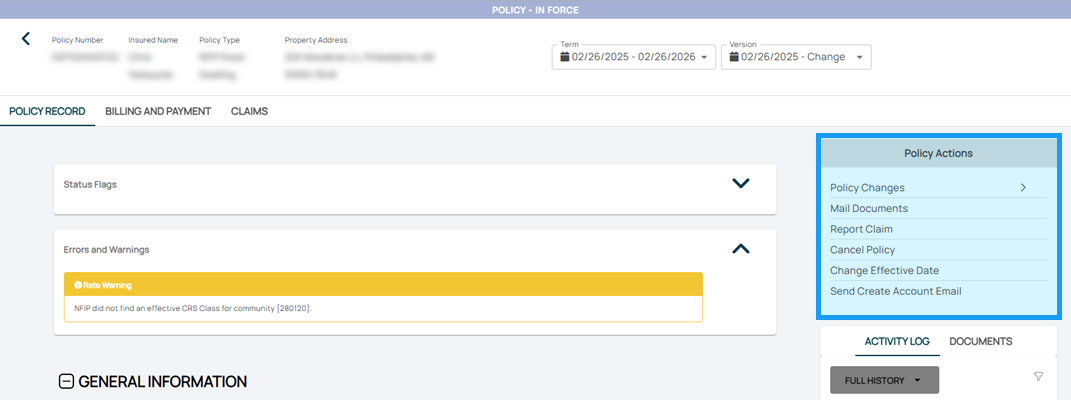
Policy Changes
Quickly navigate to specific policy sections to submit changes, such as lender clauses, coverage adjustments, or insured details.

- Access the Policy Record.
- Find the Policy Actions menu.
- Click the Policy Changes option.
- Choose from the buttons in the list
An agent can also manually navigate to each section to make the changes directly.
See NFIP Policy Changes for more specific information about how to make changes to federally-back flood insurance.
Mail Documents

Quick Steps:
- Access the Policy Record.
- Find the Policy Actions menu.
- Click the Mail Documents option.
- Use the built-in mailing tool to complete the action.
Report Claim

Quick Steps:
- Access the Policy Record.
- Find the Policy Actions menu.
- Click the Report Claim option.
Cancel Policy

Quick Steps:
- Access the Policy Record.
- Find the Policy Actions menu.
- Click the Cancel Policy option.
Change Effective Date
Request a quick update to a policy's Effective Dates; NFIP policies must be rewritten.
Quick Steps:
- Access the Policy Record.
- Find the Policy Actions menu.
- Click the Cancel Policy option.
Find more detailed instructions at the NFIP Corrections page.
Send Create Account Email
Assist policyholders in setting up their Consumer Portal accounts.
Quick Steps:
- Access the Policy Record.
- Find the Policy Actions menu.
- Click the Send Create Account Email option.
Find more detailed instructions at the Consumer Portal page.