Submit Change to NFIP Policy


This page serves as a directory for various NFIP Policy Changes agents can request through Equinox. Each change type includes details about the process, effective dates, and required documentation. Individual procedures are linked for more specific instructions.
|
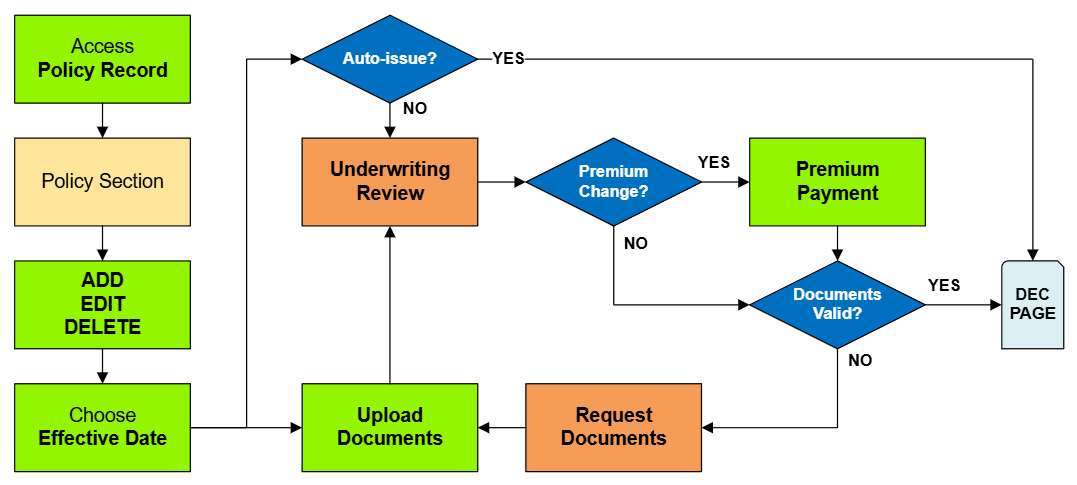
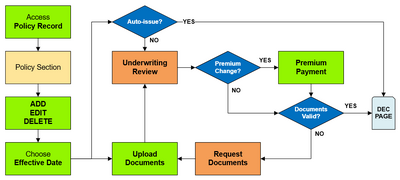
See the Policy Change Workflow below to interpret this diagram.
Policy Changes List
The table below lists the most common NFIP Policy Changes submitted by agents.
- The links in the Policy Section column show more details about each Policy Change lower on the page.
- The links in the Functions column connect to specific procedural instruction pages.
- The links in the NFIP Category column identify the level of complexity for each process.
| Policy Section | Functions | Auto-issue | Documents | Effective Date | NFIP Category |
|---|---|---|---|---|---|
| Primary Insured Contact Details | Edit | Yes | No | Request | Administrative |
| Renewal Billing Instructions | Edit | Yes | No | Request | Administrative |
| Mortgagee Clause | Add, Edit, Delete | Yes | No | Request | Policy Interests |
| Insured Name Correction | Edit | Yes | No | Inception | Administrative |
| Insured Name Update | Edit | No | Yes | Event | Policy Change |
| Additional Insured | Add, Edit, Delete | Yes | When Deleting | Event or Request | Policy Interests |
| Co-insured | Add, Edit, Delete | Yes | When Deleting | Event or Request | Policy Interests |
| Policy Assignment | Add, Edit, Delete | No | Yes | Event | Policy Interests |
| Coverage Increase | Add, Edit | No | No | Calculated | Coverage Increases |
| Deductible Decrease | Edit, Delete | No | Yes | Calculated | Coverage Increases |
| Coverage Decrease | Edit, Delete | No | Yes | Event or Inception** | Coverage Decreases |
| Deductible Increases | Add, Edit | No | No | Event or Request | Coverage Decreases |
| Elevation Certificate | Add, Edit, Delete | No | Yes | Event or Inception | Rating Adjustment |
| Structural Variables | Edit | No | Yes | Event or Inception | Policy Change |
| Property Address | Edit | No | Yes | Event or Inception | Property Address |
| Effective Date | Edit | No | Yes | Inception | Cancel Rewrite |
| Provisional Rates | Edit | No | No | Inception | Rate Category Change |
Primary Insured Contact Details
| Functions | Auto-issue | Documents | Effective Date | NFIP Category |
|---|---|---|---|---|
| Edit | Yes | No | Request | Administrative |
Edit Only: since the Primary Insured Contact Details are an essential policy detail, they cannot be added or deleted.
Procedure: Submit Change to NFIP Insured
Accurate contact information ensures that policyholders receive timely communications regarding their coverage, billing, and claims. Agents can update details such as mailing addresses, phone numbers, and email addresses directly in the system without additional documentation. These changes typically take effect upon request and are processed automatically.
| Example |
A policyholder wishes to receive their mail at a post office box and provides their updated mailing address. The agent edits the contact details in the system to reflect this change.
|
Renewal Billing Instructions
| Functions | Auto-issue | Documents | Effective Date | NFIP Category |
|---|---|---|---|---|
| Edit | Yes | No | Request | Administrative |
Procedure: Submit Change to NFIP Billing Instructions
Proper billing instructions are crucial for seamless premium payments and uninterrupted coverage. Agents can modify payment methods, billing addresses, or designate third-party payers as needed. These updates are administrative and do not require additional documentation, taking effect upon request.
| Example |
A policyholder wishes to change their premium payment method from direct billing to mortgage escrow. The agent updates the billing instructions accordingly.
|
Mortgagee Clause
| Functions | Auto-issue | Documents | Effective Date | NFIP Category |
|---|---|---|---|---|
| Add, Edit, Delete | Yes | No | Request | Policy Interests |
Procedure: Submit Change to Mortgagee Clause
The mortgagee clause specifies the rights of a lender concerning the insured property. Agents can add, edit, or remove mortgagee information to ensure compliance with loan requirements. While these changes are processed automatically, agents should verify the accuracy of lender details to prevent issues.
| Example |
A policyholder refinances their mortgage with a new lender. The agent updates the policy to reflect the new mortgagee information.
|
Insured Name Correction
| Functions | Auto-issue | Documents | Effective Date | NFIP Category |
|---|---|---|---|---|
| Edit | Yes | No | Inception | Administrative |
Procedure: Submit Change to NFIP Insured
Minor errors in the insured's name, such as misspellings, can be corrected to ensure policy accuracy. These corrections are administrative, do not require documentation, and are effective from the policy's inception date.
| Example |
The insured's name is listed as "Jon Smith" instead of "John Smith." The agent corrects the spelling in the system.
|
Insured Name Update
| Functions | Auto-issue | Documents | Effective Date | NFIP Category |
|---|---|---|---|---|
| Edit | No | Yes | Event | Policy Change |
Procedure: Submit Change to NFIP Insured
Significant name changes due to events like marriage or legal name changes require updates to the policy. Agents must obtain legal documentation (e.g., marriage certificate, court order) to process these changes. The updates are not auto-issued and become effective based on the event date.
Required Documentation: a signed request from the insured or legal document showing change to insured name
| Example |
After legally changing their name, a policyholder provides a court order to the agent, who then updates the policy accordingly.
|
Additional Insured
| Functions | Auto-issue | Documents | Effective Date | NFIP Category |
|---|---|---|---|---|
| Add, Edit, Delete | Yes | When Deleting | Event or Request | Policy Interests |
Procedure: Submit Change to NFIP Insured
Adding an additional insured, such as a co-owner or entity with a financial interest in the property, is processed automatically and can take effect based on the date the additional insured gained insurable interest in the property or upon the request date.
Editing an additional insured is allowed for corrections only; they must not change insurable interest from one party to another.
Deleting an additional insured requires their signature or proof they no longer have insurable interest.
Required Documentation: (Delete Only) A signed request from the insured being removed or written evidence, like a deed.
| Example |
A property co-owner is added to the policy as an additional insured after providing proof of ownership.
|
Co-insured
| Functions | Auto-issue | Documents | Effective Date | NFIP Category |
|---|---|---|---|---|
| Add, Edit, Delete | Yes | When Deleting | Event or Request | Policy Interests |
Procedure: Submit Change to NFIP Insured
Adding a co-insured is processed automatically and can take effect based on the date the additional insured gained insurable interest in the property or upon the request date.
Editing a co-insured is allowed for corrections only; they must not change insurable interest from one party to another.
Deleting a co-insured requires their signature or proof they no longer have insurable interest.
Required Documentation: (Delete Only) A signed request from the insured being removed or written evidence, like a deed.
| Example |
A spouse is added as a co-insured after the policy is issued.
|
Policy Assignment
| Functions | Auto-issue | Documents | Effective Date | NFIP Category |
|---|---|---|---|---|
| Add, Edit, Delete | No | Yes | Event | Policy Interests |
Procedure: Submit Policy Assignment
Transferring policy ownership, often due to property sales, requires assigning the policy to the new owner. These changes are not auto-issued and become effective on the date the property is deeded, i.e. the event date.
Required Documentation: A Policy Assignment Form must be signed by all parties on or before the closing date.
| Example |
Upon selling a property, the existing flood insurance policy is assigned from Joe, the seller, to Betty, the buyer.
|
Coverage Increase
| Functions | Auto-issue | Documents | Effective Date | NFIP Category |
|---|---|---|---|---|
| Add, Edit | No | No | Calculated | Coverage Increases |
Deductible Decrease
| Functions | Auto-issue | Documents | Effective Date | NFIP Category |
|---|---|---|---|---|
| Edit, Delete | No | Yes | Calculated | Coverage Increases |
Coverage Decrease
| Functions | Auto-issue | Documents | Effective Date | NFIP Category |
|---|---|---|---|---|
| Edit, Delete | No | Yes | Event or Inception** | Coverage Decreases |
Deductible Increase
| Functions | Auto-issue | Documents | Effective Date | NFIP Category |
|---|---|---|---|---|
| Add, Edit | No | No | Event or Request | Coverage Decreases |
Elevation Certificate
| Functions | Auto-issue | Documents | Effective Date | NFIP Category |
|---|---|---|---|---|
| Add, Edit, Delete | No | Yes | Event or Inception | Rating Adjustment |
Structural Variables
| Functions | Auto-issue | Documents | Effective Date | NFIP Category |
|---|---|---|---|---|
| Edit | No | Yes | Event or Inception | Policy Change |
Structural Variables can only be Edited, not Added or Deleted.
When a structural variable changes, documentation that proves the change is required.
- The Effective Date for a change is always the date the change occurred (the event date).
When a structural variable needs to be corrected, an agent statement that it was incorrect on the original application is required.
- The Effective Date for a correction is always the policy inception date.
The collapsed table below gives more details about each Structural Variable.
| Structural Variable | FIM | Details |
|---|---|---|
| Primary Residence | ||
| Occupancy* | ||
| Building Description | ||
| Detached Structures | ||
| Building Over Water | ||
| Foundation Type | ||
| Number of Floors | ||
| Number of Units | ||
| Floor of Unit | ||
| Foundation Description | ||
| Number of Elevators |
Property Address
| Functions | Auto-issue | Documents | Effective Date | NFIP Category |
|---|---|---|---|---|
| Edit | No | Yes | Event or Inception | Property Address |
Effective Date
| Functions | Auto-issue | Documents | Effective Date | NFIP Category |
|---|---|---|---|---|
| Edit | No | Yes | Inception | Cancel Rewrite |
Provisional Rates
| Functions | Auto-issue | Documents | Effective Date | NFIP Category |
|---|---|---|---|---|
| Edit | No | No | Inception | Rate Category Change |
An agent can issue New Business or a Renewal term with Provisional rates; however, the NFIP strongly suggests that the insurer endorse the policy within 60 days of issuance. Additional premium may be required as part of this Rating Category Change.
Policy Change Workflow